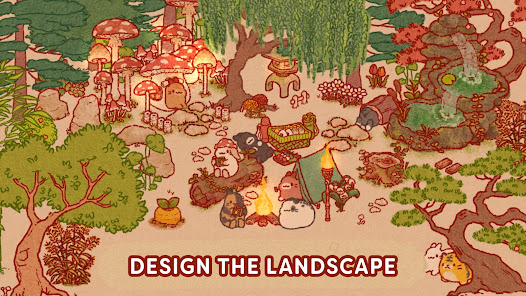
This guide covers usagi shima how to plan an island redesign with practical steps for mobile players.
Quick answer: planning an island redesign in Usagi Shima means deciding what the new layout is for before you remove anything. Pick the areas you want, keep the items that already work, and move rather than rebuild from nothing. A redesign is easier than it looks because removing decorations costs nothing and everything you take down goes back into your inventory.
Most players reach a point where the island they built in the first month no longer suits them. It is crowded, the paths go nowhere, and there is no room for anything new.
That is normal and it is fixable. A redesign is one of the more satisfying things you can do in the game.
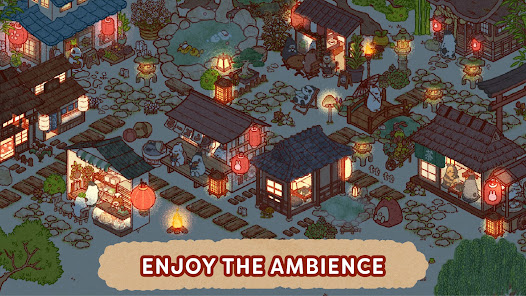
When should you redesign?
When adding something new has become difficult. That is the clearest signal that the layout has run out of accommodation.
It also happens when you stop liking the island, which is just as good a reason.
There is no penalty for redesigning and no reward for keeping an old layout, so the only question is whether you want to.
If you are hesitating, the answer is usually yes.
The island has no historical value that outweighs your enjoyment of it.
That is worth saying plainly, because players often feel attached to a layout they built early even when it no longer works. The island you made in week one was made by someone who had just started, and you have learned a great deal since.
Rebuilding it is not a rejection of that early effort. It is the same process applied with more experience.
Every long-term player has redesigned at least once, and most have done it several times.
The island is meant to change as you learn.
On this page
What should you do before you start?
Decide what the new island is for. A few areas, a main route, somewhere for toys and somewhere quiet.
That decision takes five minutes and saves an hour of moving things around without direction.
Then note the items you want to keep in place. Those are your constants, and they anchor the new layout.
Everything else is negotiable.
Without constants you will rebuild the same island with slightly different clutter.
There is a practical way to choose them. Walk the island and find the two or three spots you still like. Those are your anchors, and everything else can move.
If you like nothing, that is information too. It means the layout was never really yours, and starting closer to empty is reasonable.
Most people like more of their island than they expect.
Should you clear everything?
Usually not. Clearing completely means starting from an empty island, which is harder than editing an existing one.
Keep the things that work, move the things that are in the way, and remove the things you never liked.
That produces a better result than a blank slate, because you are building on decisions you already made rather than making them again.
It is also faster, which matters on an island with many items.
Editing beats rebuilding almost every time.
There is a mechanical reason for that. Items you keep are already positioned relative to each other, so you only have to solve the problems rather than re-solve everything.
It also keeps the island recognisable. A redesigned island that still has your favourite corner feels like yours; one rebuilt from scratch feels like a stranger’s.
Those two things together make editing the better default.
Only start empty if you genuinely want a different place rather than a better version of this one.
How do you do it without losing progress?
Nothing is lost. Removed decorations return to your inventory and can be placed again.
That makes redesigning risk-free, which is unusual in a game about accumulation.
The only cost is the time you spend moving things.
So there is no reason to be cautious about it. Take everything down if you want to.
You are rearranging, not destroying.
That is worth remembering if you are hesitant. Many games make you feel that removing something is a loss, and this one deliberately does not.
The lack of consequence is what makes experimenting easy.
Try a layout for a week and change it if you do not like it. Nothing is spent and nothing is lost.
What should the new layout prioritise?
Space, paths and a few clear areas. Those three things do more for how an island reads than any individual decoration.
Give yourself room for future additions, because you will buy more things and you will want somewhere to put them.
Keep the main route obvious and the branches short.
Then decorate each area with a clear idea rather than filling space.
An island with three good areas looks better than one with twenty scattered items.
What are the common redesign mistakes?
Clearing everything and starting from nothing. Redesigning without deciding what the new layout is for. Filling the space again immediately. And forgetting to leave room for future items.
The underlying mistake is treating a redesign as a fresh start rather than as an edit.
If you want a rule, keep your three favourite areas and rebuild around them.
That preserves what worked and fixes what did not.
It also helps to do the redesign in stages rather than all at once. Move one area, look at it, then move the next. That way you are never staring at a completely dismantled island wondering where to begin.
An island half taken apart is discouraging; an island half improved is motivating.
Frequently asked questions
Do you lose decorations when you remove them?
No. They return to your inventory and can be placed again.
Is redesigning worth it?
Yes, especially when adding new items has become difficult.
Should you clear everything?
Usually not. Editing an existing layout works better than starting from nothing.
What should a new layout prioritise?
Space, paths and a few clear areas rather than many items.
How long does a redesign take?
An evening at most, since nothing is lost and everything can be moved.
Decide what the new island is for, keep what works, and move the rest. You can also start from the Usagi Shima hub.
Official game information: usagishima.net.