This guide covers mini motorways los angeles map guide with practical steps for mobile players.
Quick answer: The Los Angeles map is wide, so distance is your main opponent rather than density. Build a long spine road early, hang short connections off it, and save tiles for the gaps between colour groups. Motorways earn their place here sooner than on compact maps.
Most maps in Mini Motorways punish you for crowding. Los Angeles punishes you for spreading out too far without a plan. The clusters start apart and drift further apart, so the run is decided by how well your long routes hold up.
What makes the Los Angeles map different?
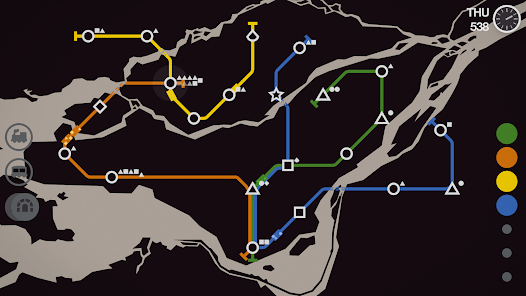
Los Angeles plays wide rather than dense. Clusters begin far apart and stay that way, so the distance between a house and its destination is the dominant cost. Short hops matter less here than on tighter maps.
The map hands you large gaps between colour groups. Those gaps look like wasted space in the first minute. Later they become the corridors everything has to pass through, and they are expensive to retrofit.
Because trips are long, cars spend more time in transit and less time waiting. That is good early, because queues build slowly. It is dangerous later, because one blocked junction stops a long line of traffic at once.
Growth here tends to push outward rather than fill inward. New houses appear on the fringes, which stretches your network instead of thickening it. Expect to extend routes more often than you widen them.
The practical consequence is that this map rewards a trunk-and-branch layout. One or two long spine roads carry the bulk of traffic. Short local connections feed into them without competing for the same tiles.
On this page
How should you start the map?
Open with a single clear direction. Pick the most promising axis in the first ten seconds and commit tiles along it. A hesitant zigzag wastes tiles you will want when the second cluster appears.
Connect the closest pairs first. A house next to its destination needs two or three tiles, and those trips pay for your next upgrade quickly. Do not chase the far cluster while the near one is still unconnected.
Leave the middle of the map open. Los Angeles tempts you to fill it because the space is there. That open ground is where your spine will need to run later, and clearing it afterwards costs double.
| Map trait | What it does | How to answer it |
|---|---|---|
| Wide spacing | Long trip times | One long spine instead of many short roads |
| Outward growth | Network stretches | Keep an extension direction in mind |
| Few natural chokepoints | Traffic merges late | Decide merge points deliberately |
| Long queues | One jam blocks many cars | Add a parallel route before it is needed |
Which tools matter most here?
Motorways are the headline tool on this map. They cross long distances quickly and take traffic off your local roads. On a compact map they are a luxury; here they are close to essential.
Roundabouts remain useful at the junctions where your spine meets local roads. That is where cars from several directions have to share space. A roundabout keeps them moving instead of taking turns.
Traffic lights are situational here. They help where two busy spines cross, and they hurt anywhere else. Adding a light to a long uninterrupted road simply puts a stop in the middle of your best route.
Bridges and tunnels matter if the map’s terrain cuts through your corridor. Check the layout before you commit a spine, because a route that has to detour around an obstacle loses the advantage of being direct.
A reasonable order is motorway first, roundabout second, and everything else only when a specific problem appears. Tools that solve problems you do not have are wasted upgrade slots.
How do you handle the wide gaps?
Treat a gap as an investment rather than a barrier. A road across empty space looks wasteful for the first few minutes. It becomes the busiest road on the map once the far cluster grows.
Build the crossing before you need it. Waiting until the far houses are queuing means building under pressure, with tiles you may not have. A quiet moment is the right time to bridge a gap.
Keep the crossing single and central where you can. Two parallel long roads duplicate cost and rarely both stay busy. One well-placed corridor is easier to upgrade later.
Watch the far side once the crossing exists. Traffic patterns on the other end are the ones you can see least clearly. A queuing ring over there is easy to miss while you watch the near cluster.
How should you place upgrades here?
Take motorways when they are offered. The distance savings compound across every trip on the map. A motorway placed on your main corridor improves the whole network at once.
Take extra road tiles when you are unsure. Wide maps consume tiles faster than compact ones, and running dry mid-expansion is a common way to lose this map. Capacity is never a wasted pick here.
Delay specialised junction tools until you see the jam they solve. A roundabout placed speculatively still costs you the choice you could have made instead. Wait for the queue that tells you where it belongs.
Do not stack upgrades on one corridor. If both your tools sit on the same road, the rest of the map gets nothing. Spread the improvements to where the traffic actually splits.
What mistakes lose this map?
Building many short disconnected roads is the first. It feels productive because houses get connected. It leaves you with a patchwork that cannot carry long trips efficiently.
Ignoring the outer clusters is the second. Their queues build slowly and then fill suddenly. By the time the ring is visible you may not have the tiles to fix the route.
Over-investing in junction tools is the third. Los Angeles rarely has the dense crossings that make roundabouts and lights shine. Motorways and tiles do more work here.
Filling the centre early is the fourth. It blocks the corridor you will want later and forces awkward detours. Leave the middle open until the spine is established.
Frequently asked questions
Is Los Angeles a hard map?
It is demanding in a specific way. It punishes sprawl rather than density, so players used to tight maps need to change their instincts.
Should I always build a motorway first?
When one is offered, usually yes. It is the tool that best answers this map’s central problem, which is distance.
How do I stop long queues forming?
Add a parallel route before the queue appears. On this map a single blocked junction stops many cars at once, so redundancy matters more than elegance.
Is it worth connecting far clusters early?
Only after the near ones are running. Early tiles are better spent earning upgrades than on speculative long roads.
Why does my score stall on this map?
Usually because the network is a patchwork of short roads. Consolidating traffic onto one or two long spines is the fix.
Official game information: dinopoloclub.com.