This guide covers mini metro saint petersburg map guide with practical steps for mobile players.
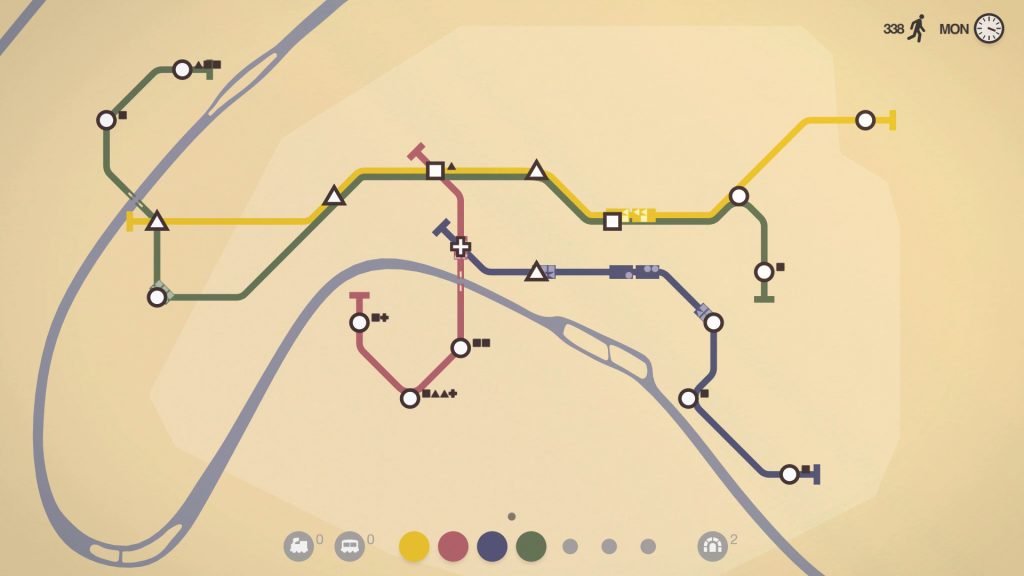
Quick answer: Saint Petersburg is a planned, grid-like map with wide spacing and a river running through it. Stations appear in straight lines rather than clusters, so long straight routes work better here than loops. Keep lines direct, use a small number of crossings, and resist the urge to weave.
What makes Saint Petersburg distinctive
The city is laid out in broad straight avenues. That geometry is reflected in how stations appear, which tend to line up rather than cluster.
That makes it the opposite of a dense map. Spacing is generous and a single line can cover a lot of ground without becoming awkward.
The consequence is that straight routes are efficient here. A line that runs along an avenue and serves its stations in order is doing exactly what the map wants.
Weaving is the mistake. A line that doubles back to collect a station ends up slow and confusing to read.
The river adds a familiar constraint, though less severely than on the archipelago maps.
Crossings matter, but they are not the whole puzzle.
What matters more is keeping your lines direct and your interchanges deliberate.
Read the geometry first, and the rest follows.
This is one of the maps where the layout is the strategy.
It also helps to keep the two axes separate rather than merging them. A line that runs north to south should not also serve east to west, because the bend costs time and makes the route harder to read at a glance.
Two clean lines that cross once will always outperform one that tries to do both jobs, and the crossing point they create is useful in its own right.
On this page
Building along the avenues
Start with one line running straight through the densest stretch of stations.
Extend it along the same axis as new stations appear in that direction.
A straight extension is cheap and keeps the line fast.
When stations appear on a different axis, use a second line rather than bending the first.
That keeps each line legible and preserves its speed.
Two straight lines that intersect will outperform one that zigzags between them.
The intersection also gives you a natural interchange, which is exactly what the map wants.
Build for those intersections rather than for coverage.
Fewer, straighter lines is the whole approach.
Where the crossings belong
Put a crossing where an avenue continues across the river.
That is where stations naturally line up on both sides, and it means one tunnel serves a whole route rather than a single stop.
Avoid crossings that exist only to reach one station on the far bank.
They stretch your line and consume a tunnel you will want later.
If you are unsure, wait until the far side has two or three stations along the same axis.
Then the crossing is obviously worth it.
Keep one tunnel in reserve where you can.
The later stages can open directions you did not anticipate.
Insurance is cheap on this map.
Interchanges and frequency
The grid layout naturally produces crossing points, and those are where interchanges should live.
A station where two avenues meet will fill quickly because it collects from both directions.
Give it a second line before it becomes a problem, and it will drain fast.
Because the lines are long and straight, trains spend time between stops, so capacity is more useful here than on dense maps.
Carriages on a long avenue line are a reasonable purchase.
Frequency still matters at the interchange itself.
If the junction lingers after a train passes, add a train to the line feeding it.
Capacity helps the journey; frequency helps the platform.
Know which problem you are solving before you spend.
Managing a growing grid
As the map expands, new stations appear further along the existing axes rather than between them.
That means your lines get longer rather than more complicated, which is a gentler form of pressure than on dense maps.
A line that simply keeps extending will eventually become slow, though, so watch its cycle time.
When a route starts taking visibly longer to complete, that is the moment to split it rather than extend it further.
Two straight lines sharing an interchange will serve the same avenue faster than one long line.
The interchange is the only new thing you need to build.
Look for a station roughly in the middle of the extended route and make it the handover point.
That single change often restores a struggling line without costing you anything.
Splitting is the quiet skill of this map.
What goes wrong here
Weaving to collect stations. Slows the line and makes it harder to read.
Crossing for a single station. Wastes a tunnel on a minor connection.
Ignoring intersections. The grid gives you free interchanges and players often skip them.
Buying carriages on short lines. Frequency matters more there.
Treating it like a dense map. Loops are less useful than straight routes here.
Most of these come from importing habits from other maps.
Saint Petersburg wants directness and legibility above all.
Build lines you can see at a glance, and the map stays comfortable.
Finally, remember that legibility matters as much as efficiency here. A network you can understand in a second is a network you can fix in a second, and on a map this open, that clarity is what keeps a long run alive.
Frequently asked questions
Is Saint Petersburg a hard map?
It is below average in difficulty if you keep lines straight. It punishes weaving more than anything else.
Should I use loops here?
Rarely. Straight avenues work better than circuits on this layout.
How many tunnels do I need?
A small number, placed where avenues cross the river. Keep one spare.
When should I add carriages?
On long avenue lines, where trains spend meaningful time between stops.
Why do my lines feel slow?
Probably because they bend to collect stations. Straighten them and the problem usually disappears.
For more, see choosing weekly upgrades and managing overcrowded stations. More coverage is on the Mini Metro hub.
Official game information: dinopoloclub.com.